Split Transactions Across Multiple Categories
Not every purchase fits neatly into one category. Learn how Tallyroot lets you split a single transaction across multiple budget categories for precise tracking.
A single transaction doesn’t always belong in a single budget category. You stop at the supermarket and walk out with groceries, cleaning supplies, and a birthday card. That’s three spending categories in one receipt.
Most personal finance tools force you to pick one category per transaction. You either dump the whole amount into “Groceries” and accept the inaccuracy, or you spend ten minutes creating manual adjustments. Neither option is great. Transaction splitting solves this.
Why splitting budget transactions matters more than you think
Miscategorized spending adds up. If you consistently lump household items into your grocery budget, your expense tracking becomes unreliable — your grocery number looks inflated and your household number looks artificially low. After a few months, your budget data stops reflecting reality — and a budget that doesn’t match reality is one you’ll eventually stop using.
The same problem shows up everywhere:
- Travel expenses — a hotel bill that includes parking and room service
- Warehouse store runs — half pantry staples, half office supplies
- Group dinners — your meal vs. the portion you’re covering for someone else
- Mixed online orders — a single charge from Amazon that’s part gift, part personal
How to split transactions in Tallyroot
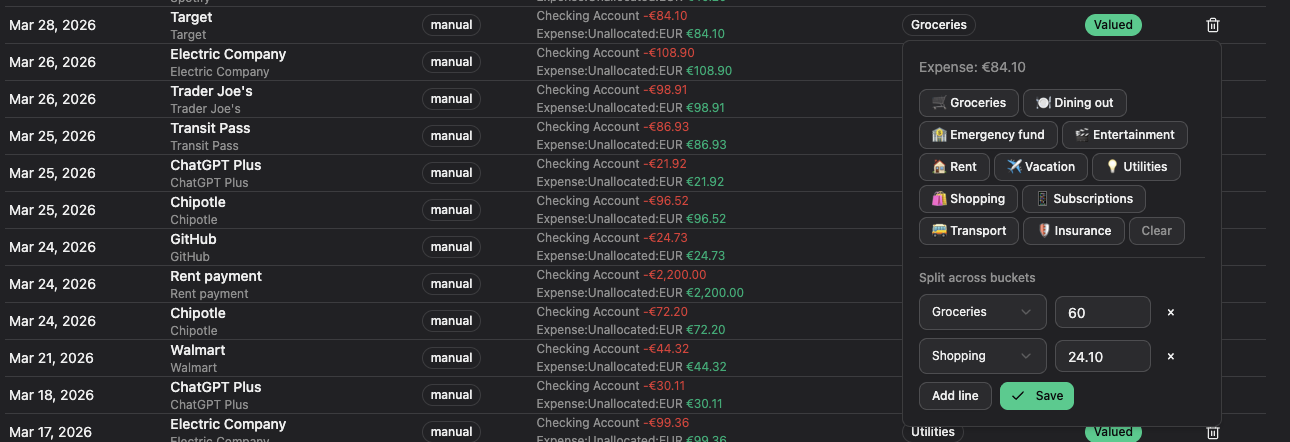
In Tallyroot’s budgeting app, any transaction can be split across as many categories as you need. Here’s the flow:
- Open a transaction from your feed
- Instead of assigning it to one category, hit Split
- Add line items — assign an amount and a category to each portion
- The amounts must add up to the original transaction total
- Save, and each portion tracks independently against its category
That supermarket trip? Split it: €85 to Groceries, €22 to Household, €8 to Gifts. Each category sees only its share. Your budget stays accurate.
Real-world examples
The weekly grocery run. You spend €120 at Carrefour. €95 is food, €15 is cleaning products, €10 is a phone charger. Split it three ways and each category reflects what you actually spent.
The business trip. A €340 hotel charge includes €280 for the room, €40 for dinner, and €20 for parking. Split it so your travel, dining, and transport categories each get the right amount.
The shared dinner. You pay €150 for a group meal. €50 was your food, €100 is what friends owe you. Split it between Dining Out and a Reimbursements category so your dining budget isn’t wrecked by one night out.
Every penny gets a job
This ties back to the core idea behind envelope budgeting and zero-based budgeting: every unit of money has a purpose. When a single transaction crosses category boundaries, splitting it means you’re still assigning every penny to the right envelope — keeping your budget tracking accurate down to the last cent.
No guessing. No rounding. No “close enough.” Your personal budget reflects exactly where your money went — even when a single swipe of your card touches three different parts of your financial life. That’s what separates real budget management from rough estimates.